Determining flood-insurance premiums

Background: I created this decision table based on information from FEMA’s National Flood Insurance Program. The purpose of my table was to demonstrate, in a presentation on using job aids, how this arrangement can guide people through a series of decisions and have them arrive at an appropriate answer.

Rating (figuring out premiums) is chapter 5 of the NFIP Flood Insurance Manual  and comes to more than 60 pages in the most recent edition. Even so, an insurance agent who wants to calculate the correct premium can make use of tables to determine (a) the property’s flood zone, (b) the specific type of property, (c) the coverage [desired amount of insurance], and finally (d) the premium based on the actual coverage.

I’m pointing this out to emphasize that you shouldn’t use my table to figure out what your flood insurance might cost. You can use it as a simplified example of a decision table, though.
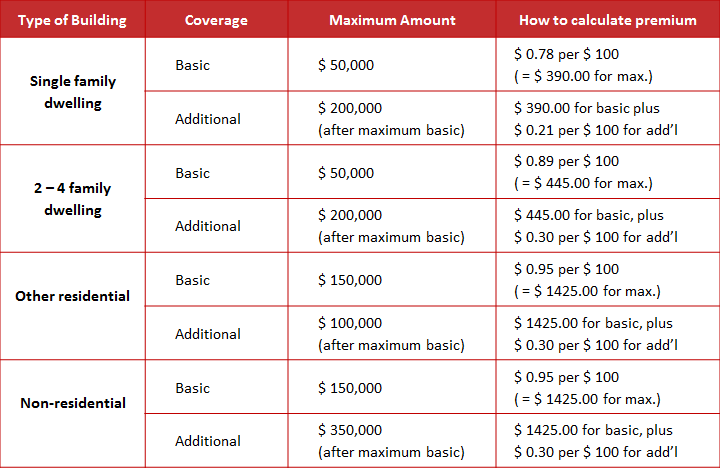
Decision table for flood insurance coverage
Just an example, not an actual rate quote.

What’s the accomplishment?  A quotation for the annual premium for flood insurance, accurate based on the type of property, the desired amount of coverage, and the overall limits for coverage.

Who’s the performer?  An insurance agent writing a flood insurance policy under the National Flood Insurance Program.

More about this job aid:

  • As noted above, this is a simplified example used in a discussion about types of job aids. It’s not meant as an exhaustive guide to determining flood insurance premiums.
  • The decision regarding premium involves three main sets of conditions, represented by the first three columns on the left:
    • What type of property is this?
    • What level of coverage is the client seeking?  (The NFIP has two levels: basic coverage, up to a given amount, and additional coverage beyond that. Additional coverage requires you to have the maximum amount under basic coverage.)
    • Given the type of coverage, what’s the maximum amount sought? (Both basic and additional coverage have upper limits. The total possible coverage for a given type of property would be the maximum amount under basic coverage plus the maximum amount under additional.)

During my recent presentation at the CSTD conference in Toronto, a volunteer using this job aid was able to describe correctly how she’d calculate the insurance premium for $150,000 of coverage on two-family duplex ($445 for the first $50,000, according to the table, and $0.30 per $100 for the additional $100,000).

Even if she’d been incorrect, just a little feedback on how to compute the premium would have been sufficient for her and for all the other participants to calculate any amount covered by the chart. In fact, when I asked if I could get $750,000 in coverage for an office building, several participants immediately said no, because the maximum coverage for commercial property is $500,000.

That’s a pretty good example of how a job aid improves the effectiveness of training.

Baby-feeding checklist

Gareth Saunders and his wife Jane had a challenge. Two of them, named Reuben and Joshua. As Gareth described things in an email, when the twins were born, the couple used Double Duty, a “care diary” where parents can track feedings, medication, and so on.

We got into a daily rhythm of creating feeding bottles for the day, and laying them out on a tray… For the first couple of weeks of doing this we’d get muddled. How much do I fill the bottles? (They sometimes took different amounts depending on the time of the feed.) Which bottles have been used already?…

Looking at this as a job aid:

What’s the accomplishment?  Twins who are fed on schedule with the desired amount of formula.

Who are the performers? Mainly Gareth and Jane, the parents, though sometimes the task was delegated to, let’s say, temporary staff.

Sometimes you need more than one job aid. The parents were trying to accomplish a number of different tasks, and some, like the feedings, occur many times a day. High frequency is usually an argument against using a job aid. In this circumstance, though, the on-the-job environment, with its conflicting demands, divided attention, and fatigue, hindered success.  Which means a checklist, a job aid to support accuracy and completeness, made a lot of sense.

A fulfilling checklist

You can see the care diary at the top of the photo. Gareth and Jane already had this type of job aid–a worksheet–to guide their child care. Worksheets help you collect pertinent information to support a subsequent action or to provide a record of what you’d been doing.

The baby-feeding cycle and its “performance requirements,” however, meant that sometimes the worksheet just didn’t get completed. The couple began using the ready-to-fill bottles, arranged on Gareth’s homemade forms, as a three-dimensional checklist.

The rule was that you returned the bottle to the space you took it from [so that you knew from the used bottle that a feeding had occurred]… The tray just sat outside their room on a bookcase until the morning when all the bottles were washed…

This method was really great, particularly when folks came in to help…

In other words, the checklist made it possible for “untrained workers” to produce the accomplishment (babies fed proper amounts according to schedule)  while maintaining the used-bottle audit trail.

Some of the reasons I find this such a useful example:

  • The parents were already using a job aid but found they weren’t always accomplishing their goal. In other words, they saw the need for improvement and set out to achieve that.
  • Gareth experimented with the format, using pen-and-ink versions and “adjusting the info on the sheets until we were happy with it.”
  • On-the-job testing led to further changes, like indicators for the amounts for each bottle, a space for an extra feeding, and an area with a different shape for medication.
  • Over eight months, the couple produced six versions of the checklist to match job requirements (the amounts and the number of feedings changes as the twins got older).

I’m especially grateful to Gareth, who is an information architect at the University of St. Andrews, for permission to share his photo and the background information he so cheerfully provided.

CC licensed photo by Gareth J. M. Saunders

Construction summary worksheet for new-housing tax rebate

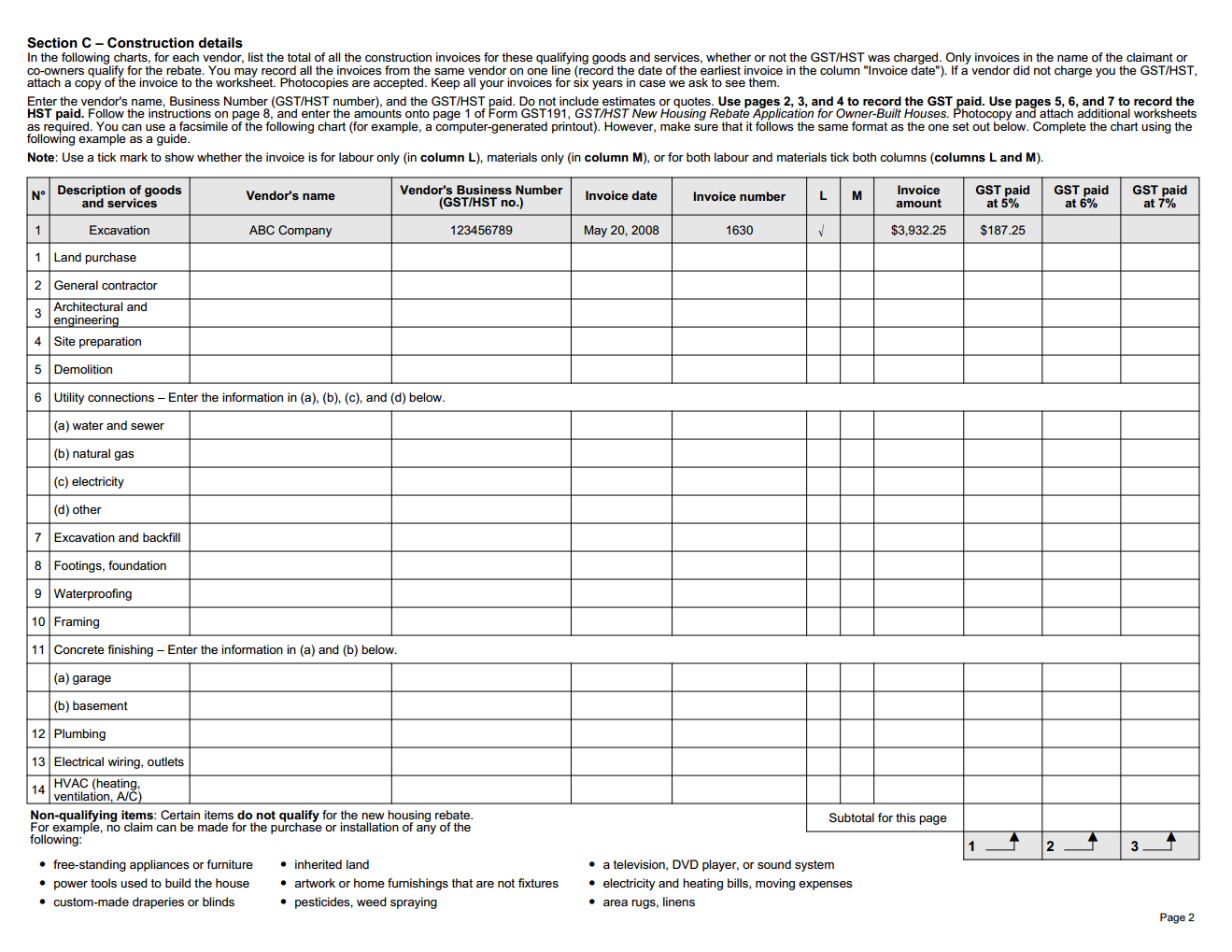
Here’s an example of a lengthy job aid: Canada Revenue’s form  GST191-WS, the Construction Summary Worksheet.

Who uses this job aid?

Canada Revenue has a process through which which certain homeowners can claim tax rebates for new construction, substantial renovation, and similar activity. Claims for owner-built homes (as opposed to homes purchased from a builder) use form GST 191. In order to submit the claim, the homeowner needs to complete this worksheet.

What’s this job aid for?

To receive a tax rebate, the applicant needs to document facts about the project, including the location of the construction, the construction period, and the fair market value of the property at the end of the project. In addition, the worksheet has six pages for documenting the various vendors, invoices, amounts paid, and amounts of GST (goods and services tax) paid.

Here’s page 2 as a sample. (Or, view the entire worksheet from the Revenue Canada site.)

Page two of Revenue Canada form GST 191 WS
(Click to enlarge this sample.)

Most projects, of course, will not have all of the 90-odd items listed (like flooring, built-in appliances, septic system, and land purchase). As a job aid, the worksheet is supporting two kinds of tasks: it prompts the applicant to consider an extensive list of possible expenses, and it guides the application through the processes needed to complete the actual application.

That’s why the final section of the GST191-WS worksheet includes a number of calculations based on data in the preceding seven pages: there are six important totals that the applicant will transfer to GST 191, the rebate application.

Section D from Canada Revenue form GST 191 WS
(Click to enlarge this sample.)

Comments

I haven’t read the instructions (which a sensible applicant would do), but I found some of the guidance in Section D confusing.  I think it’s because the section uses digits to refer both to particular boxes (fields) for information, and for page numbers, and for labels within the section.

As an example, see the circled information:

After I enter the amount from box 4 on page 7, what do I do? Multiply it by the amount in box 5? Or multiply it by 5?

And then do I add the amount in box 12, or simply add 12?

I think in both cases the answer is “the amount in the box,” but the worksheet could say so explicitly:

Total amount in box 4 on page 7: ____
Multiply that answer by the amount in box 5: ____
Divide that answer by the amount in box 12: ____

That number 1, on the right, is apparently a label for this calculation–or for the result of this calculation. You can see in the sample of Section D that there are similar labels for the next two calculations, followed by the instruction to add the three together.

This part of the worksheet has nearly half a page of blank space. It’d be a good idea to test two versions of this summary on typical performers to see if clearly labeling helps to reduce errors.

Conveyance-of-property checklist

Often people think of checklists as short, uncomplicated forms. I found a lengthy exception in the field of real estate law in Canada.

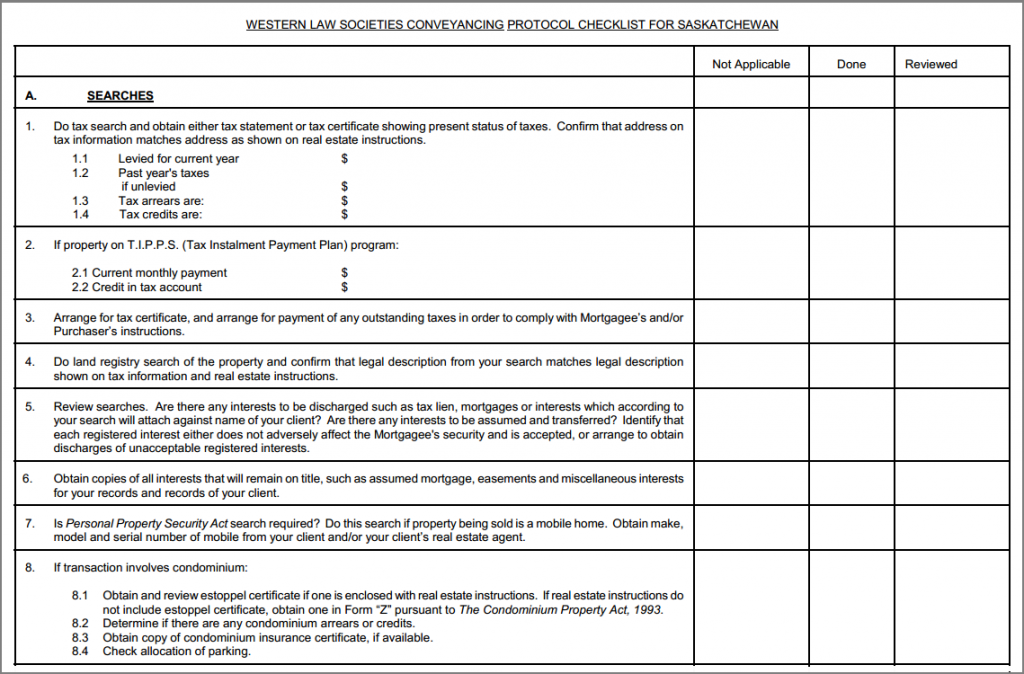
The Western Conveyancing Protocol created a standard form for solicitor opinions related to certain real estate transactions in Manitoba, Saskatchewan, Alberta, and British Columbia. The law society in each provide developed a guide for lawyers in that province that would among other things:

  • Provide lenders with a standardize form for the solicitor’s opinion
  • Allow the release of mortgage funds on the date of closing
  • Encourage due diligence by purchasers 

As part of its work, the Law Society of Saskatchewan developed a protocol checklist (2-page PDF) based on the requirements of the protocol. The image below is a portion of that check list; click the image to view the entire checklist (a PDF on the Law Society’s website).

A portion of the Saskatchewan conveyancing protocol

Who uses this job aid?

Solicitors (lawyers) working on certain real estate transactions (mainly transfers or refinancings for existing residential properties).

What’s this job aid for?

As the Law Society of Manitoba says, each society’s protocol is a “practice guide” to help produce a solicitor’s opinion. To greatly oversimplify (I am not a solicitor, I don’t live in either Saskatchewan or Manitoba), the opinion is formal notice to the lender from the lawyer saying that the he or she has followed the protocol and and that the mortgage can be funded and the funds disbursed.

In other words, it’s a highly specialized job aid intended for a limited number of practitioners in specific situations.

The Saskatchewan checklist has multiple sections:

  • Searches (e.g., for tax statements or legal property descriptions) – 15 items
  • Preparing documents for purchaser  – 10 items
  • Insurance
  • Trust conditions
  • Document submission – 9 items
  • Certification of compliance by the solicitor

One small feature I like is that each item on the checklist has a box for “not applicable” as well as one for “done” and “reviewed.”

A “not applicable” box reminds the person using the checklist to consider whether the item applies, and to confirm when it does not.

Verb2Verbe – online conjugation

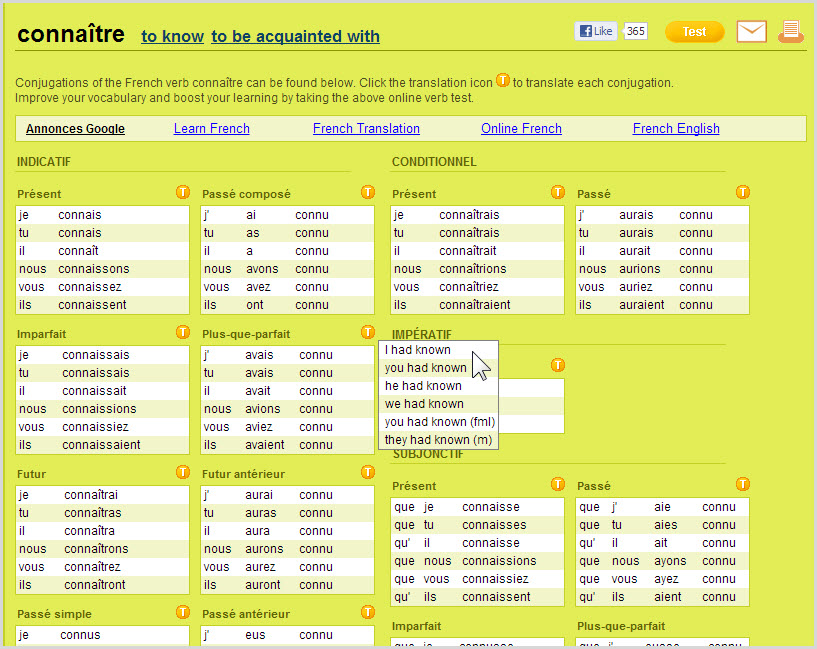
Verb2Verbe is a website for checking the conjugations of verbs in French or in English. When you reach the site, you can enter any conjugation of a verb in French or in English (spokes, she speaks, elles parlaient).

The result is a display with a conjugation for each person, tense, and mood of the verb.

(Click the image below  to see the actual display for the French verb connaître.)

This powerful example of a reference job aid has a number of useful features:

  • The title of the results page includes links to conjugations of the verb’s equivalents in the other language.
    • For example, the page for the English verb to know will have links to two French verbs: savoir (which usually means to know things) and  connaître (to know or be acquainted with people).
  • You can click the round icon with a T beside each group of conjugations to get an item-by-item translation in the other language.
  • An input form allows you to input a new verb in either language.

Reference job aids usually don’t support one specific task. Instead, they tend to organize and present interrelated pieces of information in a way that reduces the time required for someone to remember or research it.

The Scrooge-O-Meter

The Scrooge-O-Meter from LSS Financial Counseling Service is an example of a calculator job aid.  Calculators guide someone through a task by prompting for numerical values and performing calculations. The idea is to help a person reach some conclusion without having to master the factors or the math involved.

The Scrooge-O-Meter

(LSS Financial Counseling Service is part of the work of Lutheran Social Service of Minnesota.)

Who uses this job aid?

Most likely someone trying to learn the added financial burden of buying on credit.  (See additional thoughts from the group that created it, later in this post.)

What is the task supported?

I would say “awareness” or even “empowerment.”  The goal is to help someone understand the additional cost of purchasing on credit.  I filled in the numbers you see in this example.  The result says to me that “spreading out” credit payments for my holiday buying makes those purchases nearly 10% more expensive than I’d thought.

Notice that it doesn’t render judgment (“$68.72 extra?  Are you nuts?!?”).  The job aid simplifies the process so I can more readily see and understand the impact of buying on credit.  I’m free to make my own decisions about what to do next.

More about the Scrooge-O-Meter

LSS Financial Counseling Service wants consumers to know that they can turn to a national network of nonprofit financial counseling and debt management (FCS is a member of that network).  The page with the Scrooge-O-Meter offers a toll-free number, online counseling, a newsletter, and other resources.

Darryl Dahlheimer, program director of LSS Financial Counseling Service, was kind enough agree to its appearing here and also to provide these details:

There are many tools to help consumers calculate credit card repayment, but here are three reasons we like this one:

  1. It sets a playful tone, to overcome the shame/intimidation of finances for so many who feel “dumb about money” but want to learn.
  2. It helps make the true cost of using credit visible.  Plug in an example of buying that $500 iPad at a major store on their 21% interest credit card and then paying only the $15 minimum each month. You will pay a whopping $757 and take over four years to pay off.
  3. Conversely, it allows you to see the tangible benefits of paying more than minimums.

(Based on Job aid: the Scrooge-O-Meter
originally published on Dave’s Whiteboard.)

Inspecting a fire shelter

Example of a fire shelter
Example of a deployed fire shelter

Flowcharts, along with their decision-table siblings, guide a person through choices, evaluations, or decisions. As an example of a flowchart, I’m using inspection guidelines for a personal fire shelter. The guidelines come from the USDA Forest Service website (specifically, Fire Shelter Inspection Guide and Rebag Direction).

A fire shelter is a last-ditch, personal-protection device, meant to radiate heat away from a firefighter who’s been trapped by a fire. The shelter’s pup-tent shape encloses air for the fighter to breath as the fire passes over.

The photo on the right is taken from page 16 of The New Generation Fire Shelter, a 2003 publication. Although the text doesn’t say so explicitly, a portion of the shelter appears to have been cut away so you can see how the firefighter lies within it after it’s deployed. (There are hand straps to hold the shelter down.)

Firefighters receive a fire shelter as part of their equipment, and one of their responsibilities is to inspect it regularly. That’s what the guidelines are for.

A fire shelter in its bag

The second photo shows what a fire shelter looks like in its bag. Firefighters leave the bag closed until they have to deploy it, which explains the need to inspect the bag regularly.

There’s more to the guide than appears below; I’m just highlighting its flowchart. Which is a good excuse for me to point out that most job aids are combinations of techniques–for example, step-by-step instructions (a cookbook) combined with decision guidance (like a flowchart).

Who uses this job aid?

A Forest Service firefighter or a person with similar responsibilities. While you could use this to help inspect any fire shelter, the language in the guide implies that you’re inspecting your own.

What’s the task being guided?

Determining whether a fire shelter has any defects that would render it unsafe.

Notice the number of decisions involved:

  • Is there moisture in the bag?
  • What’s the status of the bag itself?
  • Are there holes? How many, and what size?
  • Does it have a label with a red R?
  • Does it have a yellow rebag label?

I want to emphasize, because of the nature of the task, that the full guide has a number of photo examples (e.g., this is what a label with a red R looks like).

From the Fire Shelter Inspection Guide

(See full guide at the U.S. Forest Service site)

(Based on Job aid: inspecting a fire shelter
originally published on Dave’s Whiteboard.)

Layout for a cell at Alcatraz

Reference job aid is a term I use for any job aid that collects or lays out information so that someone can look up a meaning, decode an example, or perform other kinds of work with facts.

The image below and its accompanying table of callouts are taken from the Institution Rules and Regulations for the former United States penitentiary on Alcatraz Island, California.    As the regulations make clear, an inmate was entitled to food, clothing, shelter, and medical care.  Anything else was a privilege and could be revoked.

Who used this job aid?

My guess is: guards, to explain to inmates how their cells were to be organized, and to make certain that cells conformed to the rules.  Also, possibly, the inmates themselves, though I have a suspicion it would be more to justify some claim:  “Hey, I’m allowed to have up to twelve books.”

What was the task it supported?

Most likely, it was a reference for what can someone have in his cell?  What is he not allowed to have?  (In the latter case, if an item is not pictured here, it’s not permitted.  This is one way to for you to be certain that Robert Stroud, despite the title of a movie, never kept birds while at Alcatraz.

Apparently as a title The Birdman of Leavenworth didn’t sound as dramatic.

(Click to enlarge)

(Based on Job aid: reference for cell layout
published on Dave’s Whiteboard.) 

PHP cheat sheet

Dave Child, a web developer in the UK, is a a creator and an advocate of cheat sheets — his term for quick reference guides.  He’s also the founder of Cheatography, a site which helps people create and share on-the-job guides like the PHP Cheat Sheet (link is to a PDF version).

Image links to http://www.cheatography.com/davechild/cheat-sheets/php/pdf/

Who uses this job aid?

PHP is “a general-purpose server-side scripting language” used to produce dynamic web pages. The person using this cheat sheet is most likely competent in working with PHP.  Not that a neophyte can’t benefit at all, but such a person probably lacks a good deal of helpful context.

What’s the task it supports?

This is an example of what I call a reference job aid.  It doesn’t guide a specific task, the way the fire-shelter inspection guide does. Instead, it organizes certain information in a way that’s helpful in a number of different but related situations: often a quick look at the job aid is sufficient. You aren’t sure of the code if you want a long month name (“September”) versus a short one (Sep).  Or you want to check the syntax of a regular expression function.  So you go to the cheat sheet.

(Tangent: In my experience, organizations that frown on terms like “cheat sheet” aren’t usually strongholds of effective on-the-job support.  All the more so if the people doing actual work refer to their quick reference materials as cheat sheets–and wouldn’t dream of letting someone take them away.)

One challenge in creating a reference job aid is deciding what information to include (and what to deliberately leave out) and how to organize it. The PHP cheat sheet uses boxes and subtitles as an organizing principle. Here’s Dave Child’s own description of how he came up with the first version:

I wrote the first one waaaaay back in 2005 because I was visiting the PHP manual so often for the same information. I’d started printing pages from the manual and jotting notes down all over my desk, and eventually decided this was just silly and organised all the notes into one page. The layout wasn’t really planned at that point.

This is the way a lot of job aids begin, especially ones for reference: people note the things that are helpful to them, but that they don’t seem to remember.  If you’re looking to support the performance of others, spend some time trying to find out what’s on homebrew job aids.  They may not have the best design; they may even include errors or misconceptions. But they invariably highlight information that the person (a) sees as important and (b) has trouble keeping in memory.

(Based on Job aid: the PHP Cheat Sheet
posed at Dave’s Whiteboard on June 13, 2012)

Learning with job aids (via Cathy Moore)

There’s this:

Blended learning
“Stir the mixture well / Lest it prove inferior…”

And there’s this:

Blended learning and job aids
“…then put half a drop / Into Lake Superior.”

Even conceding that many of the “blended learning” hits are from formal education (schools, academia), it’s a little depressing that only 3% of them mention job aids. I personally doubt it’s because everyone uses job aids. It’s almost as if developers, yearning to produce ever-more-engrossing courses, are blind to this kind of performance support.

This is closely related to what Cathy Moore says in the opening minute of the following clip:

And here, at 4%… is what is possibly the least expensive and most effective approach [for blended learning]: on-the-job training tasks. Apparently we are still stuck in the mindset that training is a course.

The clip actually covers a lot of territory in six minutes, including realistic tasks, application, relevant examples, and so on, but I want to focus here on the aspect of figuring out how not to train — or, more accurately, how to not train. Cathy demonstrates the use of “a mega job aid” to enable on-the-job learning. This is her term for combining a job aid (which stores information or guidance so you don’t have to remember it) with instruction (which tells you how to apply what’s in the job aid to a specific task).

I asked Cathy for some comments about job aids.

“Before designing formal training, consider whether a job aid is all you need.”

Here, she’s asking what makes you think you need formal training for X?  Is there another way to help people accomplish the desired result?

“If you decide training is necessary, make sure the job aids are top-notch, and consider having the ‘course’ teach people how to use the job aids.”

It’s not a job aid if you don’t use it while you’re performing the task. So if you build a job aid but find that people need to practice using it, that practice should be like on-the-job use.  They’re not going to be doing the real-world task from within the LMS (unless, poor devils, their real-work job is managing the LMS). Embalming a job aid inside a course is like disabling an elevator in hopes that people will learn how to get from the 3rd to the 9th floor without “cheating.”

“Don’t duplicate the job aid info in the course.”

  Part of the decision about whether to build a job aid involves the nature of the task. Among the considerations:

How likely is it that the task will change?

The likelier it is that the task will change (and thus that the steps for accomplishing it will change), the more sense it makes to build a job aid — and the less sense it makes to duplicate the job aid inside a formal course.

Instead, as part of your formal training, use the same job aid people will use on the job. And figure out how to make updates easily available.

No matter what learning management ideology claims, there are only three kinds of people who return to an online course for reference information:

  • People who work for the vendor.
  • Actors appearing in the vendor’s materials.
  • People on the job who are really bored or really desperate.

Because she involves herself with what people actually do on the job, Cathy has some inexpensive yet highly effective ideas about where to get started:

To evaluate and improve job aids, physically visit learners’ work stations and look around. What support materials have people created for themselves? Often someone on the job has already created a good job aid and you just need to “borrow” it.

Even if it’s a less-than-ideal job aid, the fact that someone’s created it and is using it suggests both that the task is important and that people feel the need for support as they’re carrying out the task. That’s one heck of a head start, and you haven’t had to create a single “at the end of this training program” statement.

(Based on Learning: blended, or blinded?
posed at Dave’s Whiteboard on June 28, 2012)