Job Aids: The What, the What For, and the Why

A job aid is external information
that a person uses
to reduce reliance on memory
while accomplishing a task.

I often tinker with my definition a bit. For instance, sometimes I want to move the “reliance on memory” part up a line, but I don’t like the way the sentence flows. More important than the word order are the elements:

Information. Used. Less memorization. Accomplishment.

The what

I’ll expand on each element in other posts. Here’s the gist:

    • Job aids deal with information, not skills. If you’re skilled at something, you’ve learned it and you’re fluent in applying it successfully. Stored in memory, retrieved from memory in appropriate circumstances.
    • If a job aid isn’t used while someone carries out a task, it’s not really a job aid. Job aids support on-the-job performance.
    • Reducing reliance on memory is how a job aid provides support. Most tasks involve some level of information. You can store information inside your head, or outside. Inside costs more, so you should consider where best to apply limited resources like time, money, and attention.
    • An accomplishment, in this context, is not simply an outcome. It’s a result that meets requirements.

On that last point: not every “requirement” is required. If you don’t expect your new insurance agent to calculate flood insurance premiums as rapidly as a five-year veteran, then speed isn’t a requirement for new hires.

Sometimes — more often than officialdom likes to admit — good enough is good.

That’s the “what” part of job aids in 200 words or so.

On to the “what for”

Job aids help people produce useful results even when they don’t know how.

Probably you don’t know much about trade-in allowances for hyperspace teleporters. Even so, with the following chart, there’s a good chance you can figure out the trade-in value for a 2016 Parsec B teleporter from the Small Batch price level.

Give it a shot before reading past the chart.
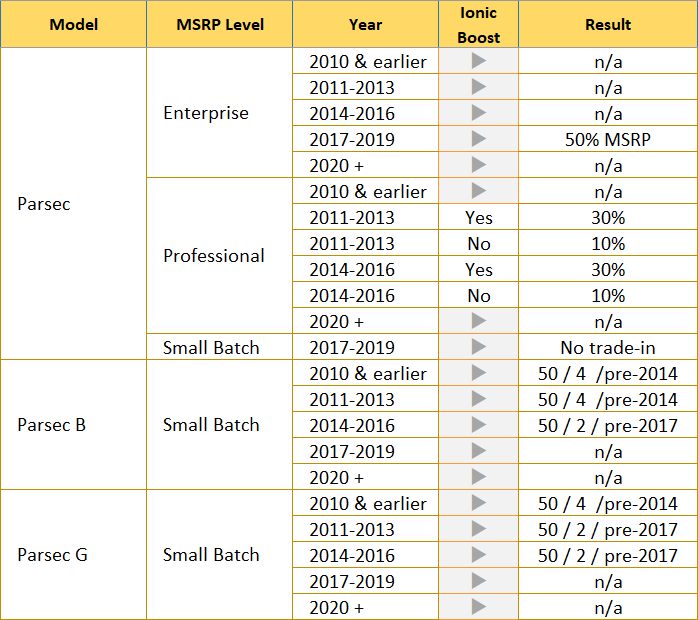
A chart with five columns, showing the trade-in value, if any, for 22 different models of (utterly imaginary) hyperspace teleporters. The columns are organized by model, manufacturer's suggested retail price, model year, and the presence of the ionic boost feature.
Disclaimer: Not an actual guide to trade-in values for hyperspace teleporters.

The answer is “50 / 2 / pre-2017.” It’s correct even if you haven’t yet learned what it means (50% of original MSRP, less 2% per year for each year prior to 2017).
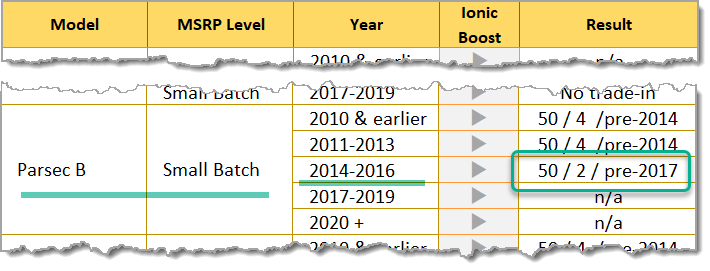
Model, level, and year give the trade-in value.

Otherwise: you didn’t really need to know what a hyperspace teleporter is. You didn’t need to know the names of models, nor what the price levels meant, and for this question you didn’t need to know what an ion boost is (an option offered only for certain models, and never for the Parsec B).

In the real-life example on which the teleporter trade-in job aid is based, there were eight possible results (including “n/a,” which here means no trade-in) for some three dozen combinations of models, price levels, year range, and ion boost.

That’s a lot of information to store inside someone’s head, especially if they don’t get a lot of trade-in queries at Maxine’s Teleporter Emporium.

The why

Giving Danny the receptionist this chart, and maybe 10 minutes of explanation and 10 of practice, means that Danny is almost certainly going to succeed at telling somewhat what trade-in their old teleporter might qualify for…

Because he’s got external information to use on the job that reduces reliance on memory while helping him accomplish that task.
A little help

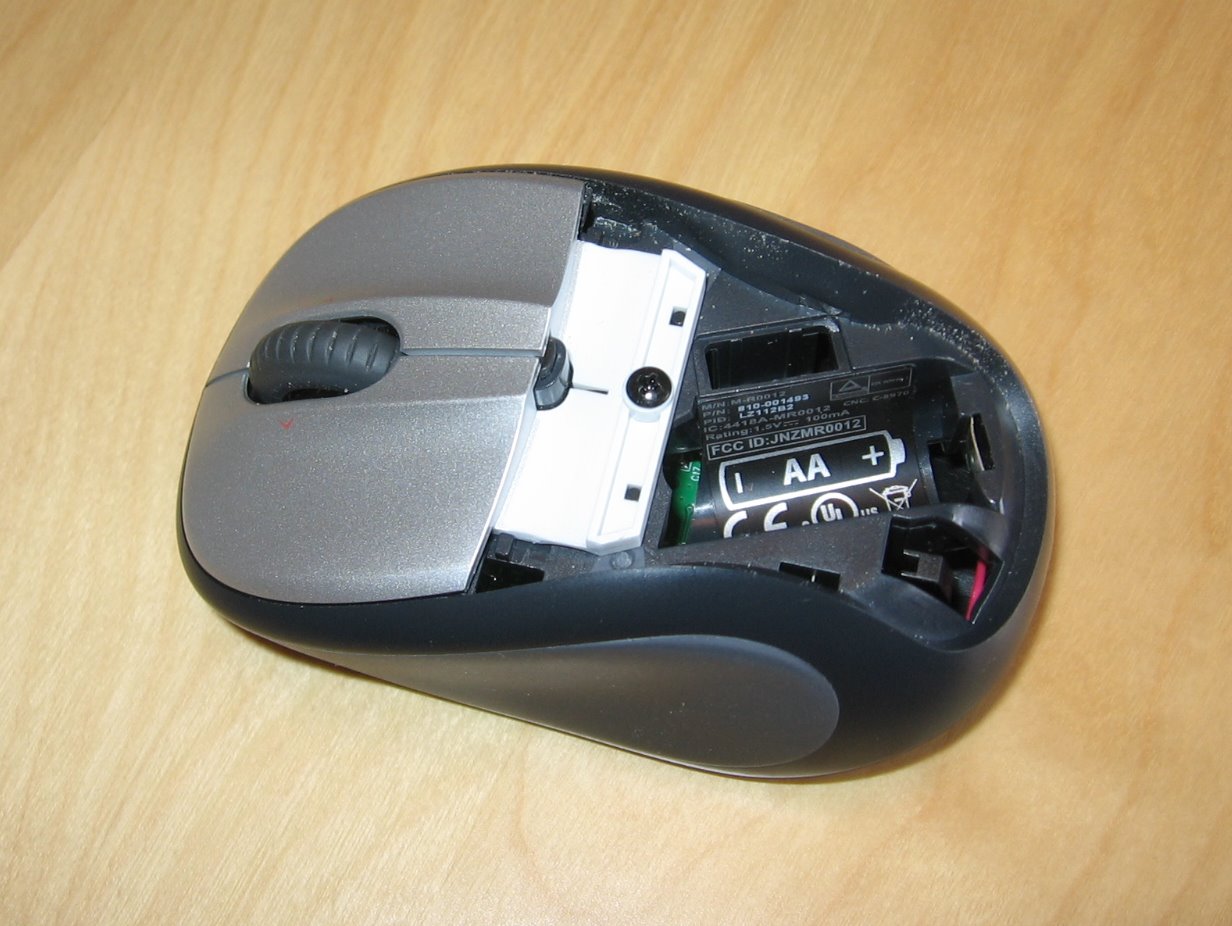
In one of my first presentations about job aids, I showed this picture.

A wireless computer mouse. Part of the cover has been removed. There's no battery, but the space for a AA battery is clearly labeled, with an outline to show that the positive end of the battery should go to the right.
Is there a job aid here? If so, what job is it aiding?

“Job” is a bit much, but I argued that there was clearly a task being aided. You don’t have to remember what kind of battery goes into this mouse, nor do you have to remember which way the battery should go.

You do need to recognize that the mouse isn’t working because the battery is dead, and you do need to know how to get the cover off, but those conditions are met by a great many people who’ll run into the “what kind / which way” situation.

This past week, I had to rent a pickup truck to haul some construction material. The last time I rented a truck was at least 15 years ago, so many parts of the process were unfamiliar to me.

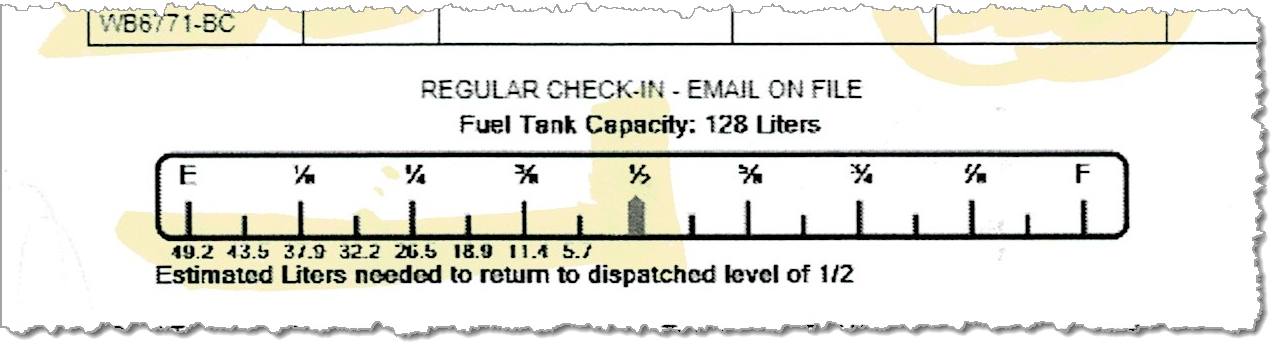
I knew I needed to find out about refueling the truck. The clerk at the rental business said the tank was half full, and that’s where it should be when I returned the truck. Then he pointed out a diagram on the rental agreement; it’s the bottom section of this closeup:

A portion of a truck-rental form, with a diagram of a fuel gauge. The half-full point is highlighed. Under each fraction of a tank below half, there are numbers to indicate how many liters of fuel it would take at that level to return the tank to half full. Exampe: if the tank is 1/4 full, it would take 26.6 liters to get to half full.
The fuel-gauge diagram from the truck rental contract

I’ve never in my life seen on a vehicle rental agreement anything to give me a hint of how much fuel I might need (in liters or in gallons) to get the vehicle up to the required amount. I don’t know how common this is in the truck-rental world, because I’ve rented two in the past 16 years.

Almost always when I’ve rented cars, the agency wants them returned with a full tank, so estimating isn’t much of an issue. But the task here was to bring the truck back half-full. Thanks to this little job aid, I could tell that at 3/8ths of a tank, I needed something like 12 liters.

I ended up at a pay-before-you-pump station. A little guesstimating told me I needed about twenty dollars’ worth, which seemed simpler than asking for a dozen liters. When I started the truck to head off, the tank was just slightly more than half full.

A successful accomplishment, thanks to a little help from a little job aid.

What’s a job aid? (A look inside the box)

A definition I’ve been working on:

A job aid is:

External information
designed to reduce reliance on memory
that someone uses to accomplish results
that they otherwise couldn’t.

External information…

When someone’s got information inside their head that they can retrieve and apply when needed, we say they’ve learned that information. Think of a job aid as holding information that doesn’t need to be learned.

There’s more of that than you might think.

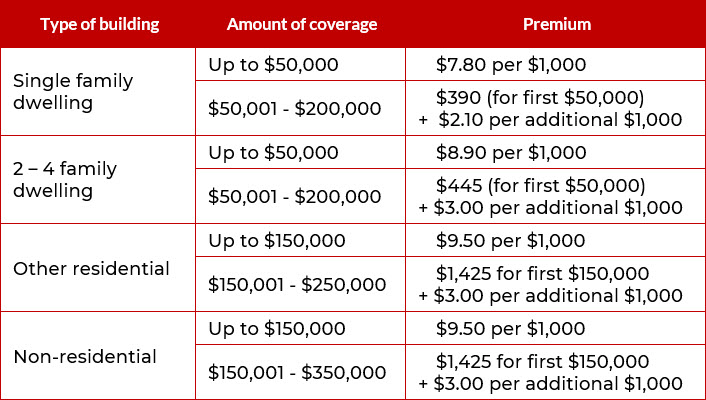
You can’t calculate flood insurance premiums if you haven’t learned what insurance means or can’t do basic math.  With a guide like the chart below, though, you don’t need to have learned the coverage limits for different buildings nor the applicable rates. They’re stored in the job aid.

A chart showing fictional costs for flood insurance, based on the type of building and the desired amount of coverage.
Flood insurance premiums for different buildings. (Not actual premiums. Also, this blog does not sell flood insurance.)

You can probable figure the premium for $200,000 of flood insurance on a 2-family dwelling, even without being a licensed agent.*  And if you are an agent, such a chart reduces your cognitive load.

*  Calculating the flood insurance premium:
— When the type of building is “2-4 family dwelling,” and 

 — when the amount of coverage is $200,000,
 — then the premium is $445 for the first $50,000…
— plus $3 per thousand for an additional $150,000 ($3 x 150 = $450).

The premium is $895.

…designed to reduce reliance on memory…

I use “memory” instead of “learning” when I’m talking about job aids, mostly to highlight the kind of information that typically doesn’t need to be stored in memory. Often that’s voluminous facts, or infrequently-used information, or information that’s likely to change.

I once was a ticket agent for Amtrak. After a few months on the job, I could quote the fares from Detroit, where I worked, to about 50 different cities, including the family-plan discounts for accompanying spouse or children.

When the fares changed, I had to consult the tariff (the official rates and rules), just as when I needed to do something unusual for my office, like write  Metroliner tickets or group tours. There was no point in my storing those steps in memory–too complicated, and too infrequent, to justify the effort.

It’s true that in some circumstances, repeated use of a job aid will help you learn the information it contains. That’s the training-wheels effect: repeated application of the job aid makes you familiar with its contents. You start storing some of the content in your own memory.

(Whether that’s always a good idea is a different consideration.)


…that someone uses to help accomplish results…

By accomplish, I have two things in mind.

First, there’s the completion of whatever the task is. Once you’re finished, what do you have that you didn’t have when you began? The task of calculating a flood insurance premium has as its result a specific flood insurance premium for a specific level of coverage on a specific structure.

Workers at NASA celebrate the successful landing of the Perseverance rover.
NASA’s Perseverance rover lands on Mars.
Safely. In working order. NASA photo.

The second thing I have in mind is that the results meet requirements. Did the thing you completed achieve your goal? Was the insurance calculation correct for the type of building and the amount of coverage?

Accomplishment is crucial for job aids. If someone can produce accurate flood insurance quotes using the job aid, without memorizing the types of structures, levels of coverage, and rates at each level, what’s the rationale for requiring such memorization?

That’s not to say “job-aid everything.” Rather, there’s often a lot of inertia and ritual about knowing things rather than looking them up. The effort to accurately and reliably memorize a great deal of factual information isn’t always justified by the effort nor by post-memorization performance.


…that they otherwise couldn’t.

This phrase is the flip side of the “accomplish” part.

It underscores the way a job aid makes task-specific information external, and the way it supports a person who doesn’t have that information stored in their head. Without the flood insurance chart or prior skill in producing premium quotes, you couldn’t calculate a appropriate rate. With the chart — a job aid storing external information designed to reduce reliance on memory, while helping you produce an accomplishment that you couldn’t have otherwise — you can.

Just like it says on the box.

Searching for faucet parts, or, tapping into results

Job aids are part of a broader category called performance support.

Performance support is a tool or other resource, from print to technology-supported, which provides just the right amount of task guidance, support, and productivity benefits to the user—precisely at the moment of need.

– Marc J. Rosenberg,
At the Moment of Need: The Case for Performance Support
(eLearning Guild membership required).

The faucet in question

I came across a great example of effective performance support thanks to… a loose faucet handle.

That handle on my kitchen faucet needed to be in just the right position or the faucet would drip. I noticed some wear and wondered if I could get replacement parts.

This is a Moen faucet, but I didn’t have the model name, and I couldn’t find the part number.

I went to Moen’s website, and I was impressed enough with how it dealt with my situation that I’m discussing it here.

If you’re supporting performance, you start with the performance you think needs some support. At a minimum, this means you need to know what gets accomplished and who’s going to accomplish it.

I think it’s helpful to explore why (as in, what’s the result for, and likely, who’s the client or recipient of the result), but that’s a topic for another post. This time, the ultimate client is me, a person with a leaking faucet.

Moen’s approach to performance support

At the bottom of Moen’s home page, you find this:

Need support?
Need support?

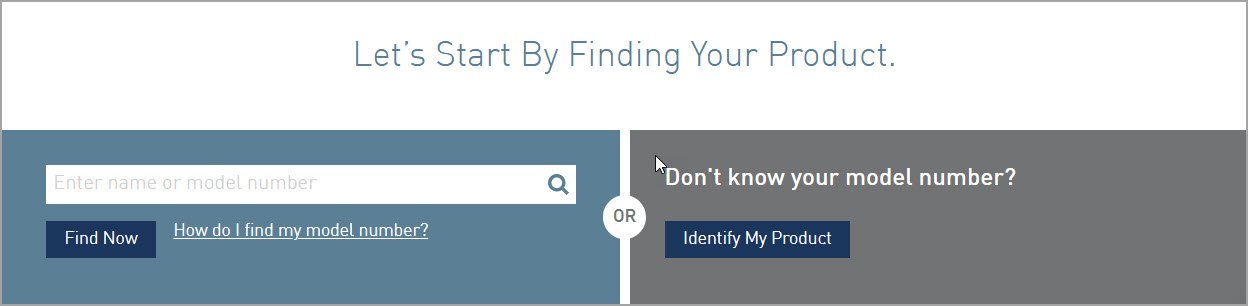
Moen can find a product by name (the Align faucet) or by model number (the 7565 series). The box on the left has a link to help you find the model number.

These are the fast paths to finding information: assuming you’ve got the right name or number, you’re well on the way. But I didn’t have either of these things, so the right-hand box was waving to me with its practical button, “Identify my product.”

Let's start by finding your product
Let’s start by finding your product

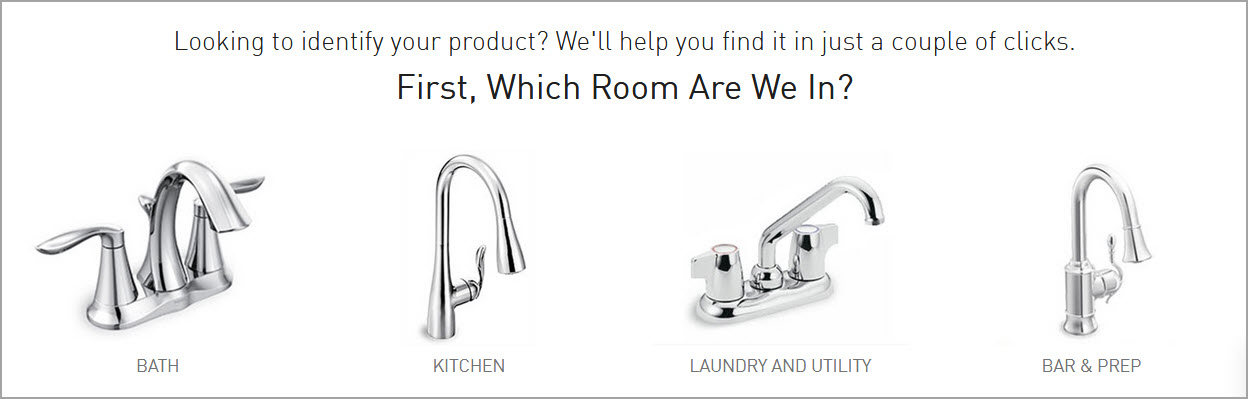
I could think of many ways to categorize faucets and related parts, but this is a truly consumer-focused question: what room are we in?

Which room are we in?

“Kitchen” was the choice, of course. (I don’t know if Moen makes outdoor faucets, but if that’s what I was looking for, I’d choose the “laundry and utility” category and see.)

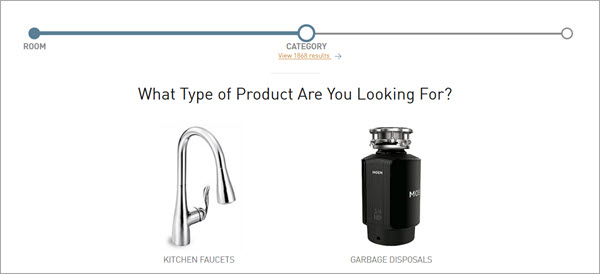
Two things I noticed at this point. First, we’ve only got those Moen products you’d find in the typical kitchen: faucets, and garbage disposals.

Less obvious, at the top of this image, under the word category: there are 1868 possible items. That’s a lot of stuff to sort through. I clicked “kitchen faucets.

What kind of faucet?

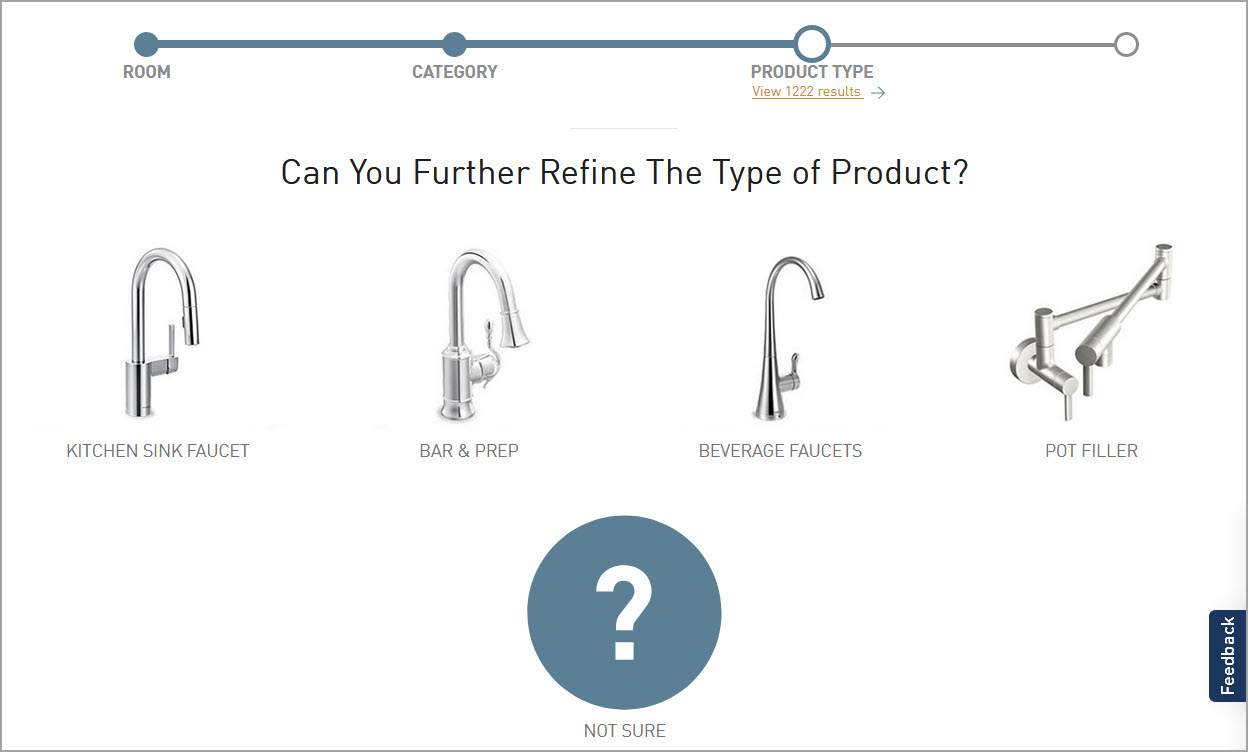
I really like this combination of text and images to help guide me in refining my search. Just by choosing kitchen faucet, I’ve reduced the possible items by a third (from 1868 to 1222). I might not have been aware of what a pot filler faucet is, but now I have an idea. And if I’m not clear on the difference between a kitchen sink faucet and a beverage faucet, I can always choose “not sure.”

Kitchen sink it is.

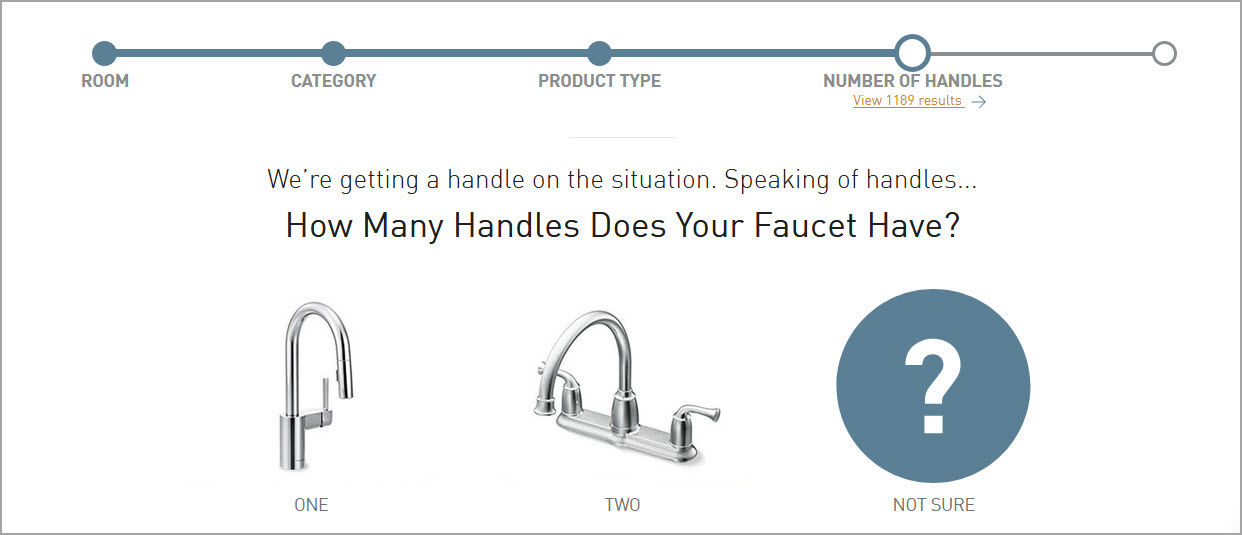
I’ve eliminated another 50 possible faucets, and the invisible expert nudges me along. I don’t have to know much about plumbing to count handles. My own faucet (remember, the one with the leak?) had one.

Pull out or pull down?

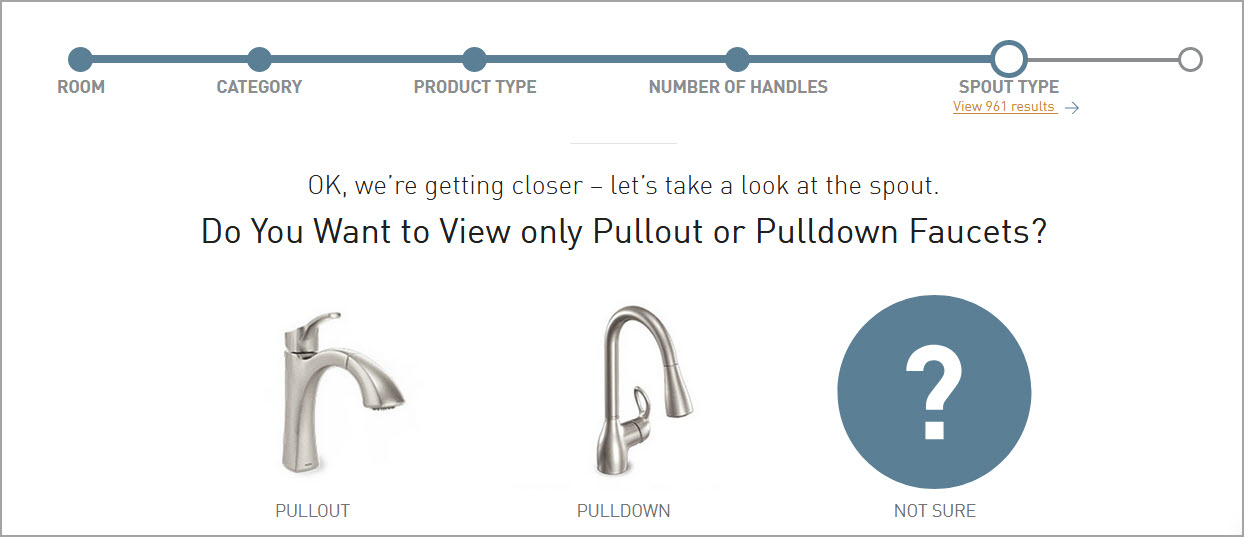
Continuing down the logic path, we’ve eliminated about half the possible matches from that first screen. As far as I can tell, the big difference between pullout faucets and pulldown ones is the height of the faucet. Mine was clearly a pulldown.

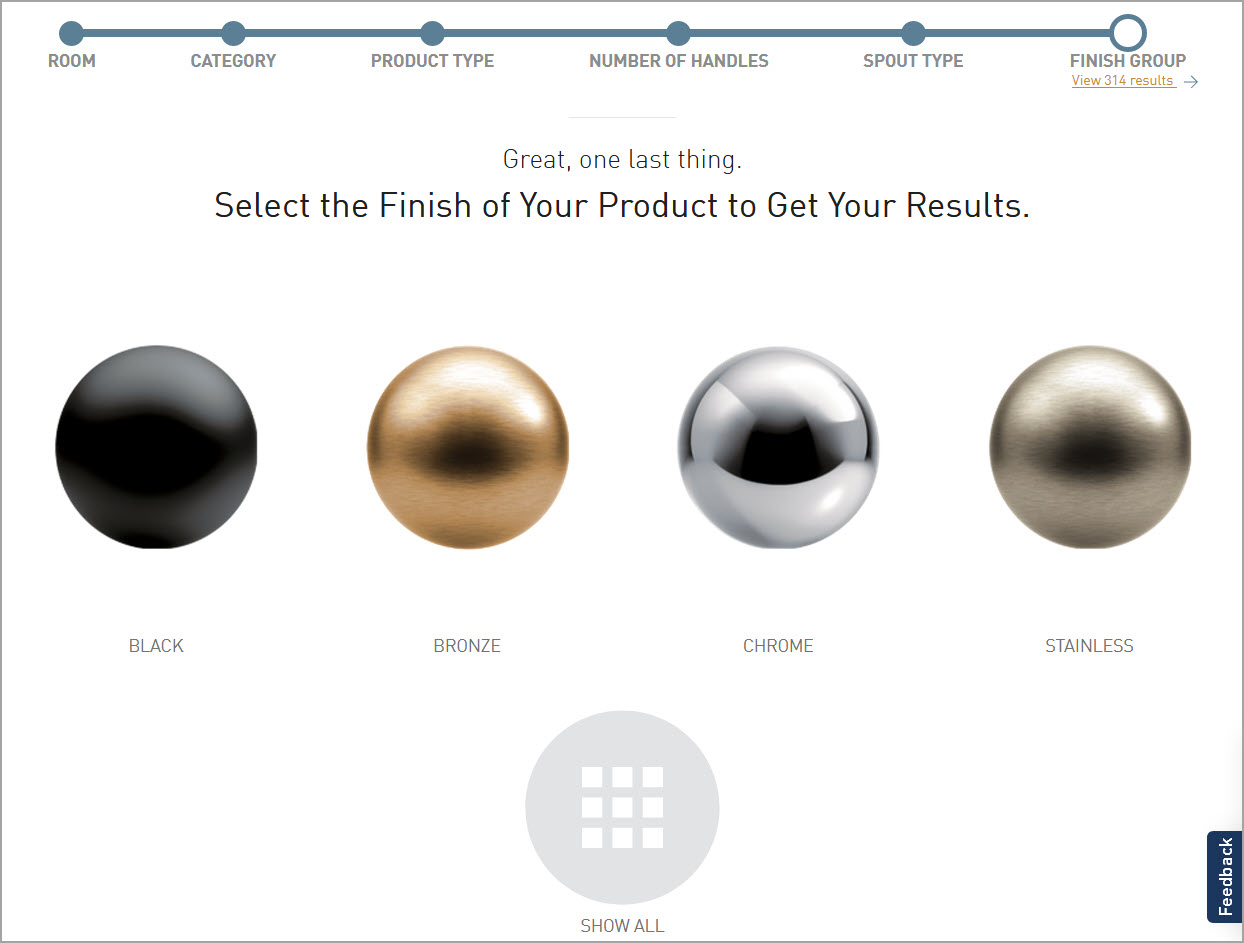
Select a finish
Select a finish

Only 314 faucets, and only 10% of them have a chrome finish.

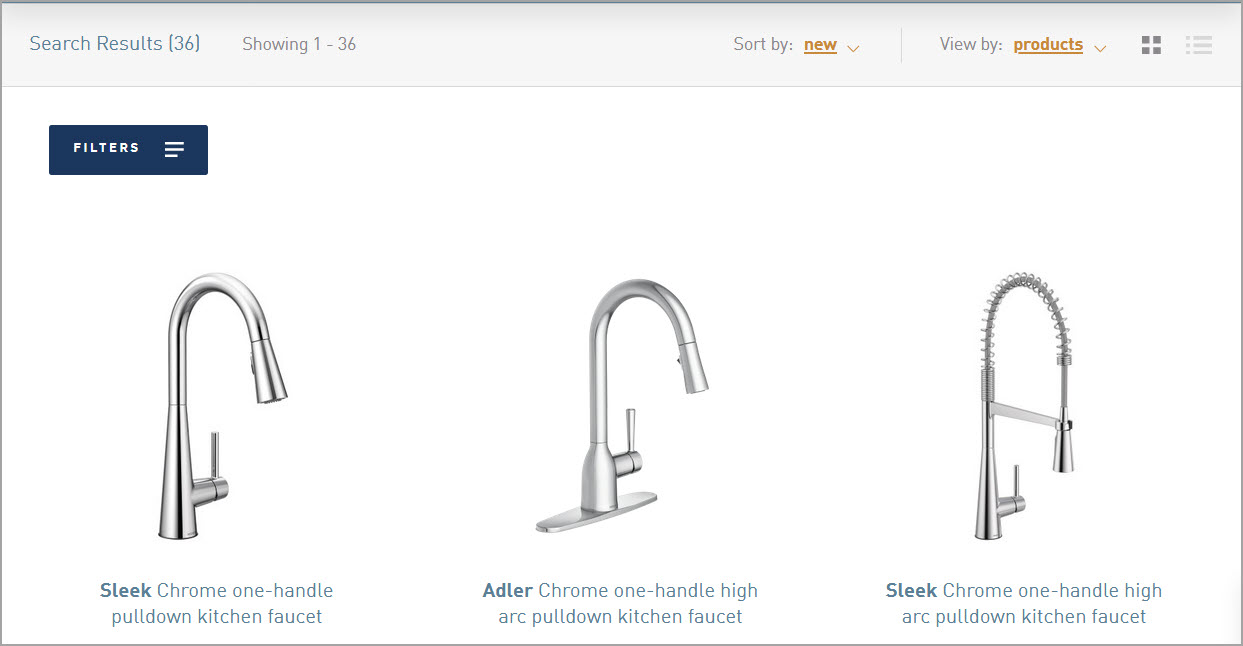
36 chrome faucets
36 chrome faucets

When I scrolled through the results, though, I didn’t find my own faucet. It turns out Moen was prepared for further inquiry, which I probably could have chosen earlier.

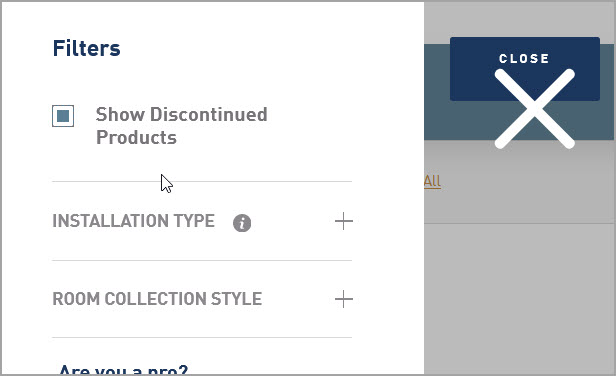
Show discontinued products

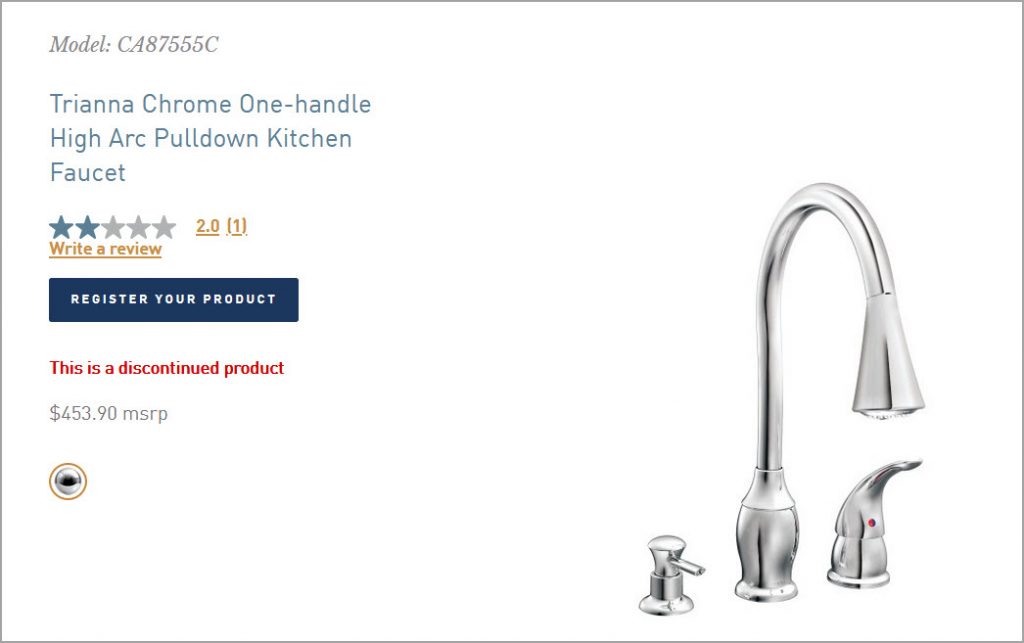
More responses this time. I paged through the list, and if you compare the photo I started with with this result, you’ll see I have the discontinued Trianna faucet.

Is this a job aid? And if not, does it matter?
Job aids are one form of performance support. My definition is that they contain information external to the performer, used on the job to reduce the need for memorization while enabling results.

Moen’s support page definitely supports the goal of finding a particular faucet. All the information is external. In a sense, there’s no memorization, assuming that you know what a faucet is, what the rooms are, and so on.

Moen’s search isn’t intended to guide plumbing professionals so much as consumers. For them, digging out faucet information is not part of their job. It’s a potential obstacle on the way to a result like finding faucet parts or locating a family of models (say,  to find kitchen faucets that match the bathroom ones).

So the difference I see is relatively minor. The performance is infrequent, and nearly all the information got built into a system such that the search (and the guided decisions) seem like part of the task, rather than explicit suggestions on how to go about the task. The built-in aspect is a different way of handling “external information” than placing it into a job aid that someone uses along with the system or tools that enable the accomplishment.

What’s common to either approach is a highly detailed analysis that in this case made the faucet search flow smoothly.


Work in progress: my session scanner

Job aid design usually starts with an analysis that asks  about conditions, steps, signals, responses, the desired accomplishment, and its criteria.

In this post, I’m showing a job aid I created that started from a different point: something I wanted to have, but didn’t.

What’s the problem?

My Building Job Aids workshop is made up of parts I think of as elements. One might be a mini lecture; one might be an activity to produce a decision guide; another, a quick judge-these-examples round I call Best in Show.

Although I have a plan for each session, the actual workshop varies from the plan. I shorten or drop or swap elements based on the skills and interests of the participants (or, sometimes, the relentless ticking of the clock). And after the fact, I go over what took place and decide what I want to do or do differently next time.

This isn’t easy to manage when you’re mainly concerned with running the workshop. What kind of support was I looking for?

  • A list of planned elements, with an easy way to see duration and order.
  • A list of potential elements that I could add or substitute on the fly.
  • A tool to track the elements, duration, and sequence I actually used, including any changes.
  • A way to record short notes in passing.
Enter the session scanner

I tried several layouts before deciding that what worked for me was a half-day plan on a single page. (For a full-day, I’ve got a second page with the afternoon hours.) 15 minutes felt like the smallest chunk of time, so it became the basis for a grid. Here’s what the scanner looks like when I’m done planning:

The session scanner
The session scanner. (Click to enlarge.)

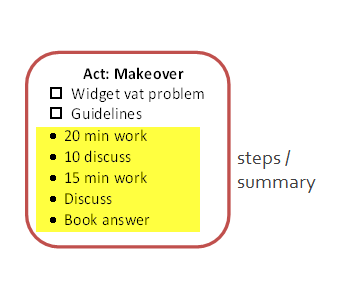
In the Planned column, the shapes represent individual elements, like the Makeover activity scheduled for 11. The height stands for the planned duration. The color around an element doesn’t mean anything; I just find them easier to distinguish when they’re not all the same color.

The Actual column is for tracking what elements I used, and how long they took in the real world.

You can figure out what the Notes column is for. And the Options column in the example lists three elements that I can add or substitute on the fly.

In the element shapes, checkboxes remind me about supporting materials for the particular element. Bullet items summarize of the main steps or stages.

The scanner at work

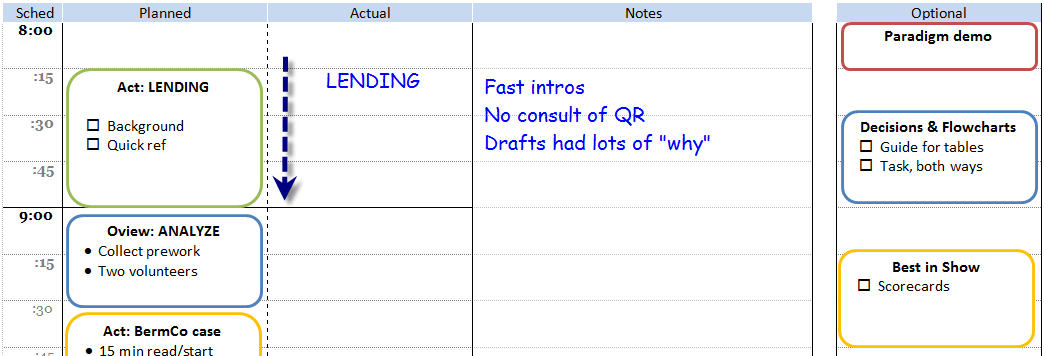
The next example shows the scanner after I finished the first element: an arrow to indicate elapsed time, and a couple of notes. (“Drafts had lots of ‘why'” would be important to me — suggesting the activity was not making the point that there shouldn’t be much “why” in this job aid.)

Duration with notes
Duration with notes

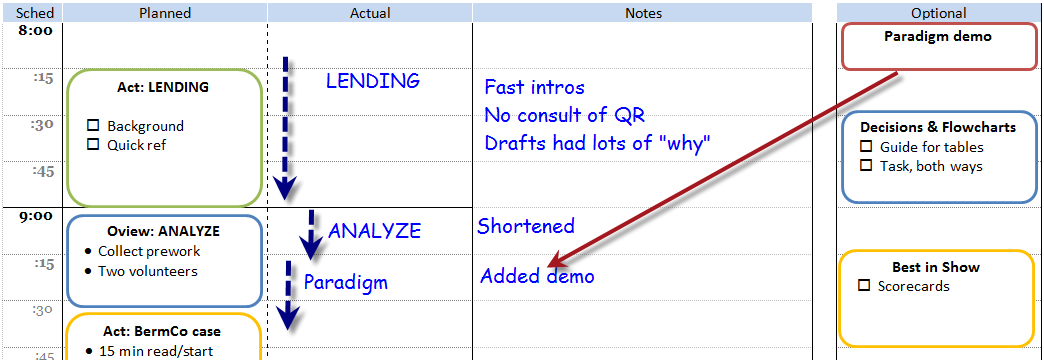
Next, the scanner about an hour later. The Analyze element didn’t take as long as planned, so I added the optional Paradigm Demo element.

Optional element added

One more example. The BermCo activity started later than planned, and also ran longer. My notes remind me that there were extra questions during the “check” stage, and that the debrief activity also ran long but didn’t strike me as a problem. (This example also shows the highly innovative “cross it out” method of showing a dropped element.)

More tracking, including a deletion
So far, so good

If I were faster at digital note-taking on the fly, I might create an electronic version of the scanner and keep it on a tablet. But I’d want to avoid lag from a screen that had blacked out, and I’d need a way to write notes at least as fast and as legibly that I can using pen and paper.

All in all, I’m pleased with the current incarnation of the session scanner. It helps me in preparation, in delivery, and in post-session analysis.